
Free for homeowners. Results by email, usually in about 5 minutes.
BidCompare AI
Turn confusing contractor bids into a clear apples-to-apples comparison.
- Free, no account needed
- Never shared with anyone, including your contractors
- No sales calls afterward
- Privacy and FAQ
A real comparison
Four kitchen bids, from $34,000 to $58,650
A Ventura County homeowner sent us four bids for the same kitchen remodel. On price alone the choice looked easy. Lining the bids up told a different story.
The higher bids were pricing more work
The two most expensive bids included a main electrical panel upgrade, a new window with exterior stucco repair, and engineering plans. The cheaper bids left those out, so the real gap was far smaller than $24,650.
The cheapest bid was almost two years old
It was dated August 2024 and needed a fresh quote. It also leaned on an open $10,000 cabinet allowance, a placeholder budget rather than a fixed price, so the final cabinet cost could land well above it.
One bid disagreed with itself
Its line items added up to $51,190. Its payment schedule added up to $58,650. That's a question to settle in writing before anyone signs.
Names and the address are removed. Every figure comes from the original bids.
How it works
Contractors don't write bids the same way. One prices the permits, one leaves them out, one writes "owner to supply" next to the tile. BidCompare AI lines them up so the totals mean the same thing.
- Upload your bids1 to 6 bids for the same project, as PDFs or photos.
- Every bid gets lined upWhat each one includes, leaves out or leaves vague, item by item.
- Get the results by emailTwo or more bids get a spreadsheet and a plain-English report. A single bid gets a Bid Check report. Usually in about 5 minutes.
What you get
Two files, from a fictional three-bid bathroom remodel. Open them and see for yourself.
The spreadsheet
Every bid side by side, adjusted to the same scope
TotalsScopeMaterials
| Contractor | As bid | Adjusted |
|---|---|---|
| Budget Bath Example Co. | $25,800 Lowest as bid | $33,050 |
| Sample Bath & Tile Inc. | $29,200 | $29,200 Lowest, adjusted |
| Placeholder Design-Build LLC | $37,700 | $37,700 |
Budget Bath looked cheapest until the permits, dumpster, tile, fixtures and shower door it left out were priced in from the other bids.
- Every bid's total as written, and adjusted to the same scope
- What each contractor included, left out or left vague, line by line
- Allowances and who supplies the materials
- Every filled-in figure labeled, so you know exactly what to ask about
The report
What the numbers mean, in plain English
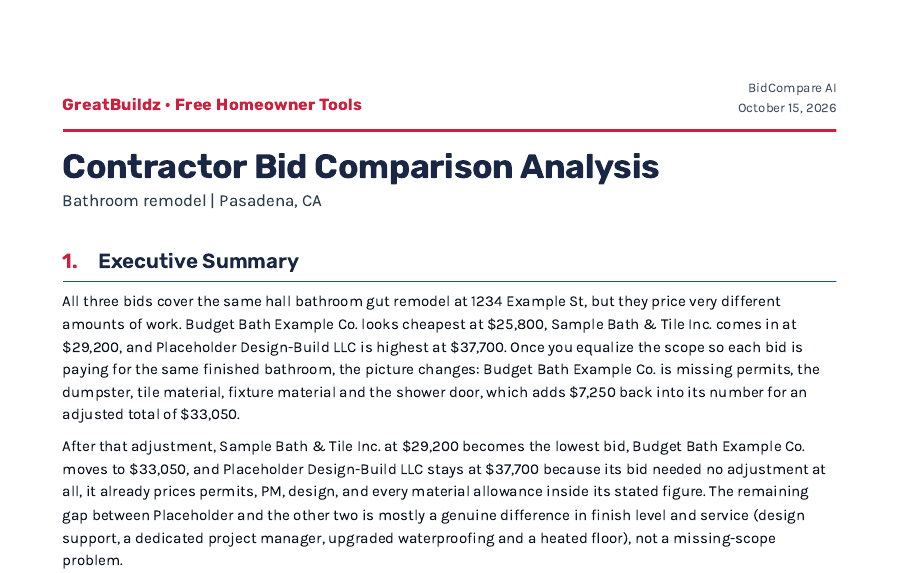
- Why the prices are different
- What each bid left out
- Red flags worth a second look
- Questions to ask each contractor before you sign
What it tends to catch
- Missing scopePermits, electrical or site work one bid quietly leaves out.
- Vague allowancesTile, fixtures or cabinets with no real budget behind them.
- Totals that don't add upLine items or payment schedules that disagree with the bottom line.
- Paperwork gapsAn oversized deposit, a short expiry date or a license number to verify.

Who's behind it
Built by the GreatBuildz team
I'm Jon Grishpul, co-founder of GreatBuildz. I grew up working alongside my grandfather, an electrical contractor, and since 2019 GreatBuildz has helped more than 2,000 California homeowners find and hire vetted contractors. Comparing bids has always been part of that work. BidCompare AI does it for anyone who has bids in hand, client or not.
Why it's free
GreatBuildz is paid by contractors, and only when a homeowner hires one we introduced. Homeowners never pay us. Using this tool doesn't put you on a call list, and we'll only help you find another contractor if you ask.
Questions homeowners ask
Is it really free? What's the catch?
Yes, it's free. GreatBuildz earns a fee from contractors, and only when a homeowner hires one we introduced. Comparing your bids doesn't sign you up for anything, and nobody will call you.
Who sees my bids?
The AI that writes your comparison reads them, and they're stored securely while it works. Jon gets a copy of each finished comparison, which helps us catch mistakes and improve the tool. We never share your bids or your contact details with anyone, including the contractors who wrote them.
Will my contractors know I used this?
No. We never contact them, and nothing in the comparison goes back to them.
Are my bids used to train AI?
No. Keeping your bids private and secure is a top priority for us. They're stored securely, never shared, and never used to train any AI model.
What kind of files work?
PDFs or photos (JPG, PNG, HEIC), 1 to 6 bids per upload, up to 25 MB and 40 pages each. Scanned PDFs work when the text is sharp. A photo too blurry to read gets a message before you upload, asking for a sharper picture or a scan.
I only have one bid. Can I still use it?
Yes. Upload it and you get a Bid Check: what the bid covers, what it leaves out, and the questions to ask the contractor. It doesn't judge the price, since one bid can't show whether a price is high or low. When a second bid arrives, upload both and you get the full comparison. If your project is in California, GreatBuildz can introduce you to vetted contractors for more bids, free: get matched.
Does it work outside California?
Yes, the comparison reads bids from anywhere. A few checks, like the state's limit on deposits, follow California rules, and our contractor matching only covers California.
How accurate is it?
The method behind it was built from real bid comparisons GreatBuildz has done for homeowners and tested against real bids. Every figure it fills in is labeled as an assumption, so you can see what came from the bids and what didn't. It can still miss things, so check the numbers against your original bids before you sign anything.
What if something goes wrong?
If a comparison can't be finished, you'll get an email saying so. Reply to it and a person will help.
Ready when your bids are.
Upload 1 to 6 bids, as PDFs or photos. Two or more get a side-by-side comparison, and one gets a Bid Check. The results land in your inbox, usually within about 5 minutes. No account to create, no sales call afterward. Your upload is secure and never shared with anyone, ever.
Every comparison is written by AI. The method behind it was built from real bid comparisons GreatBuildz has done for California homeowners, reviewed by our remodeling experts, and tested against real bids for accuracy. It can still miss things, so check every figure against the original bids before you sign anything.
Upload my bidsWant one more bid so you have more to compare? If your project is in California, GreatBuildz can match you with a vetted contractor, free, and only when you ask: get matched. We only work in California. The comparison tool itself is open to anyone.
More free tools
Pick the one that matches where you are. See all the Free Homeowner Tools.